Key Takeaways
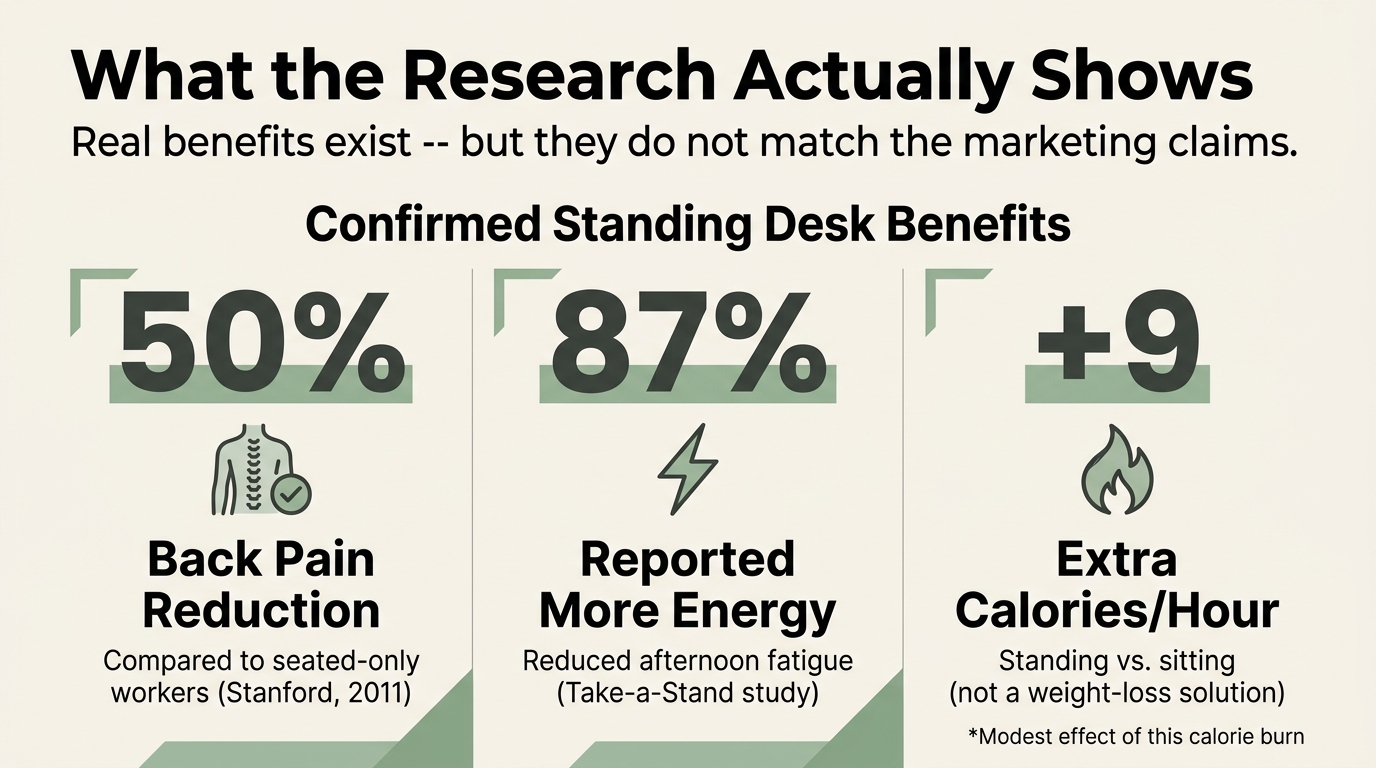
- Standing desks genuinely reduce lower back pain – a BMJ study found a 50% reduction in lumbar discomfort compared to seated-only workers (Graves et al., 2018).
- The calorie-burning claims are overstated – standing burns only 9 extra calories per hour compared to sitting (Betts et al., 2019).
- Static standing carries its own risks – prolonged standing without movement is linked to a twofold increase in heart disease risk (Smith et al., 2019).
- The optimal approach is position variety – alternating between sitting, standing, and active seating throughout your day.
- A kneeling chair can deliver many of the same benefits without the leg fatigue, varicose vein risk, or foot pain.
Standing desks have gone from niche office equipment to mainstream workplace fixtures in under a decade. The marketing promises are bold: burn more calories, eliminate back pain, live longer. But does the science back any of it up?
The short answer is some of it, yes – but with important caveats that most standing desk brands will not tell you. The research shows real benefits for back pain and energy levels, real risks for your legs and cardiovascular system, and a better alternative that most people overlook entirely.
In This Guide
The Science Behind Standing at Work
The standing desk movement was born from a real concern. A 2015 meta-analysis of 47 studies found that prolonged sedentary time was associated with a 24% increased risk of cardiovascular disease, 91% increased risk of type 2 diabetes, and 17% increase in all-cause mortality (Biswas et al., 2015).

That sounds terrifying. But here is the part that got lost in the headlines: those studies measured total sedentary time, not office sitting specifically. The solutions they pointed toward were movement breaks, not standing desks.
This distinction matters because it changes the entire conversation. If the problem is lack of movement rather than the act of sitting, then a standing desk is only one of several possible solutions – and not necessarily the best one. For more on why sitting causes back pain, see our science deep-dive.
Confirmed Benefits of Standing Desks
Standing desks do offer measurable benefits in specific areas. Here is what peer-reviewed research actually supports.
Reduced lower back pain
This is the strongest evidence in favor of standing desks. A 2018 British Medical Journal study of 146 office workers found that those using sit-stand desks reported a 50% reduction in lower back pain compared to seated controls (Graves et al., 2018). The key phrase: participants alternated between positions, not stood all day.
Increased energy and alertness
Standing desk users reported 87% more energy and vigor during the workday compared to their baseline sitting habits (Pronk et al., 2012). Standing engages your leg muscles, improving blood circulation to the heart and brain.
Modest caloric increase
Here is where the marketing overpromises. Standing burns approximately 0.15 calories per minute more than sitting – roughly 9 extra calories per hour (Betts et al., 2019). Over a 6-hour standing period, that is about 54 extra calories. That is one small apple.
The Real Risks Most People Ignore
Standing desk marketing rarely mentions the downsides. But the research is clear: prolonged standing carries its own set of health risks that can be just as problematic as prolonged sitting.
Lower extremity discomfort
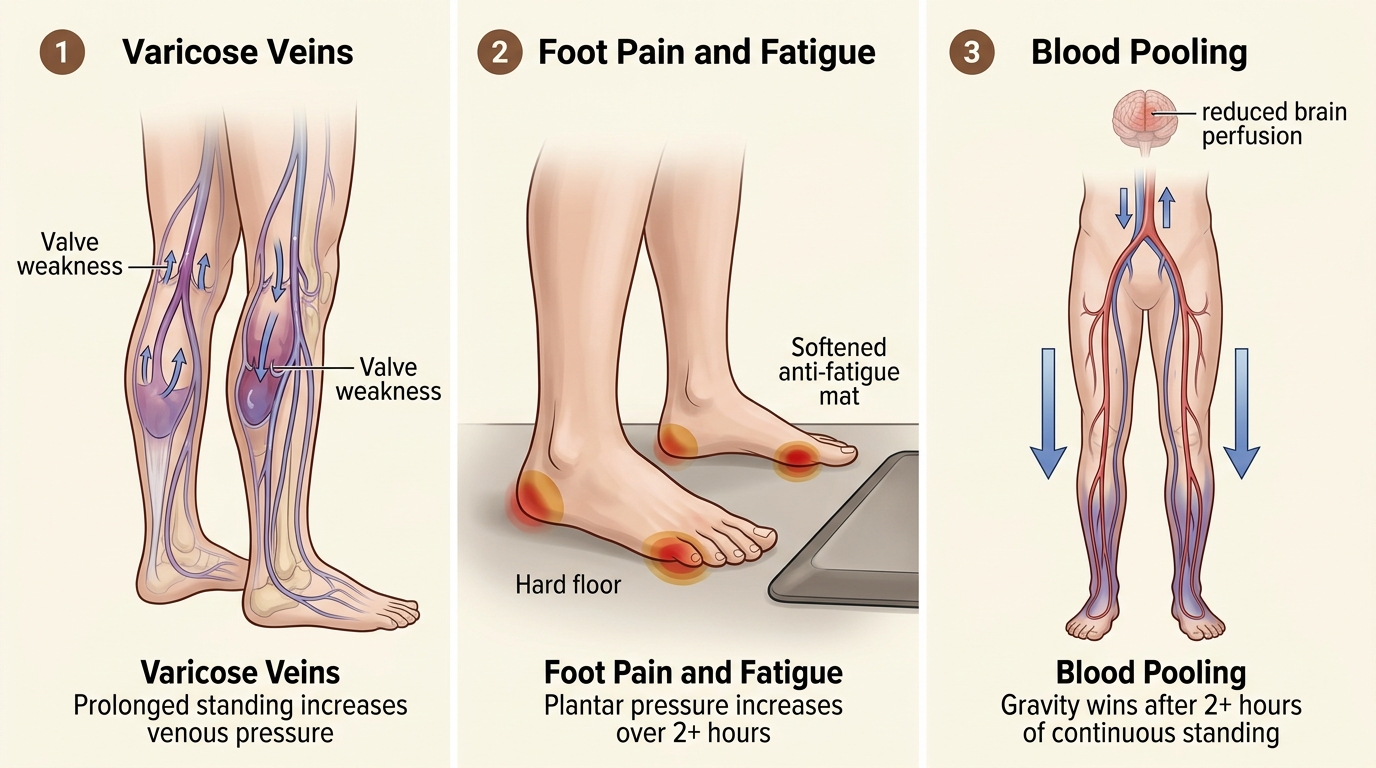
Standing for more than 2 hours continuously increases foot, knee, and hip discomfort significantly (Coenen et al., 2017). Prolonged standing without movement allows blood to pool in your leg veins, potentially contributing to varicose veins – documented at higher rates among those who stand all day.
Reduced fine motor performance
Standing may impair precision tasks. Research found that standing increases wrist extensor muscle activity during typing, potentially raising your risk of repetitive strain injury (Husemann et al., 2009). If your work involves detailed mouse control or extensive typing, this matters.
If the risks of prolonged standing concern you – varicose veins, joint fatigue, foot pain – active sitting offers the metabolic benefits without the orthopedic tradeoffs. The NYPOT Kneeling Chair keeps your muscles engaged while you stay seated.
How to Transition Safely: A 4-Week Protocol
If you have decided a standing desk is right for you, do not dive in cold. Your body needs time to adapt. Jumping straight to 6 hours of standing will create new problems before it solves old ones.
- Week 1: Stand for 15 to 20 minutes, 2 to 3 times daily. Choose low-concentration tasks like email or calls
- Week 2: Increase to 30-minute sessions, 3 to 4 times daily. Start incorporating focused work
- Week 3: Aim for a 1:1 sitting-to-standing ratio, alternating every 30 to 45 minutes
- Week 4: Find your personal rhythm. Research supports 50 to 70% sitting, 30 to 50% standing (Buckley et al., 2015)
Essential setup tips
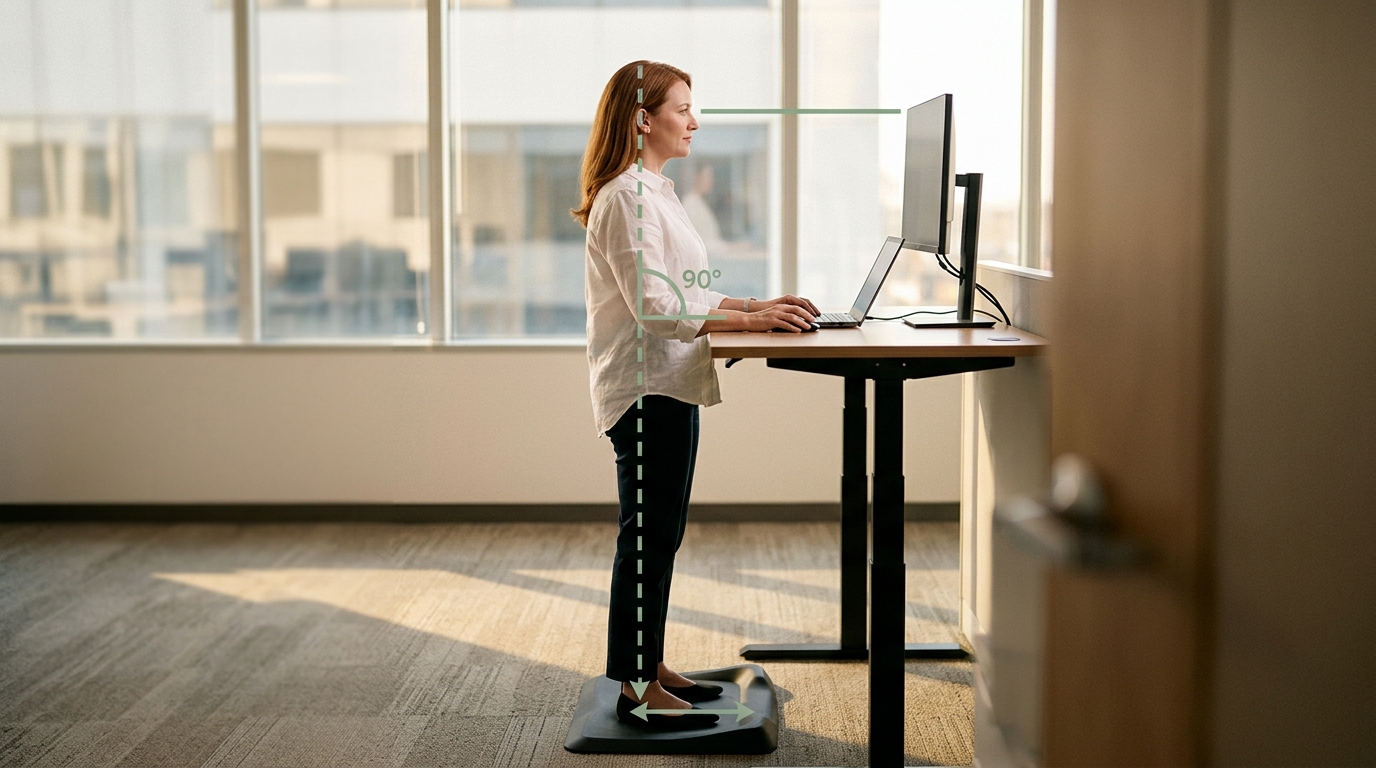
- Monitor: Top of screen at or slightly below eye level in both positions
- Arms: Elbows at 90 degrees with forearms parallel to the floor
- Feet: Shoulder-width apart, periodically shifting weight
- Mat: Anti-fatigue mats reduce lower limb discomfort by up to 50% (Lin et al., 2012)
- Footwear: Supportive shoes are essential – avoid standing barefoot on hard surfaces
Standing Desk vs. Kneeling Chair vs. Hybrid Setup
Most standing desk guides present standing as the only alternative to sitting. But there is a third option that research increasingly supports: active seating. Here is how the three approaches compare on the metrics that matter.
| Factor | Standing Desk | Kneeling Chair | Hybrid Setup |
|---|---|---|---|
| Back pain reduction | 50% (Graves, 2018) | 20% less lumbar flexion (Bridger, 1988) | Best results – combines both |
| Core engagement | Moderate (leg-focused) | High (trunk stabilizers active) | High (varied muscle groups) |
| Leg fatigue risk | High after 2+ hours | Low (weight distributed) | Low (position changes) |
| Varicose vein risk | Increased with prolonged use | Minimal | Minimal |
| Typing accuracy | Reduced (Husemann, 2009) | Maintained | Maintained |
| Cost | $300 – $2,000+ | $150 – $500 | $450 – $700 |
| Space required | Full desk replacement | Fits existing desk | Same as current setup |
| Best for | Calls, brainstorming | Focused work, typing | Full workday coverage |
The Seated Alternative That Delivers Standing-Desk Benefits
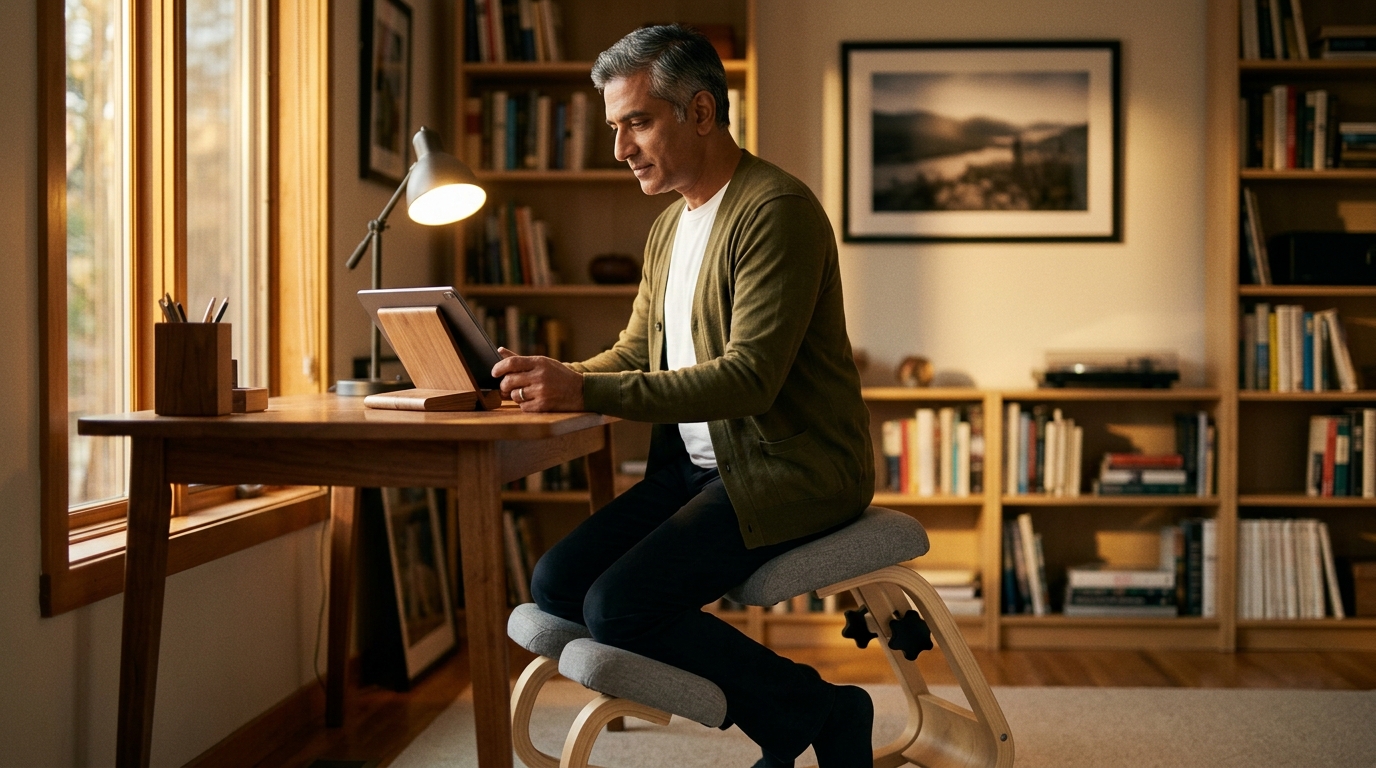
Research shows active sitting on a kneeling chair increases core engagement and caloric burn similarly to standing – without the leg fatigue, varicose vein risk, or need for anti-fatigue mats. The NYPOT Kneeling Chair fits under any standard desk.
The hybrid approach: best of all worlds
The research points toward position variety as the real solution. Here is a practical daily breakdown based on the evidence. For more on standing desk vs kneeling chair, see our full comparison.
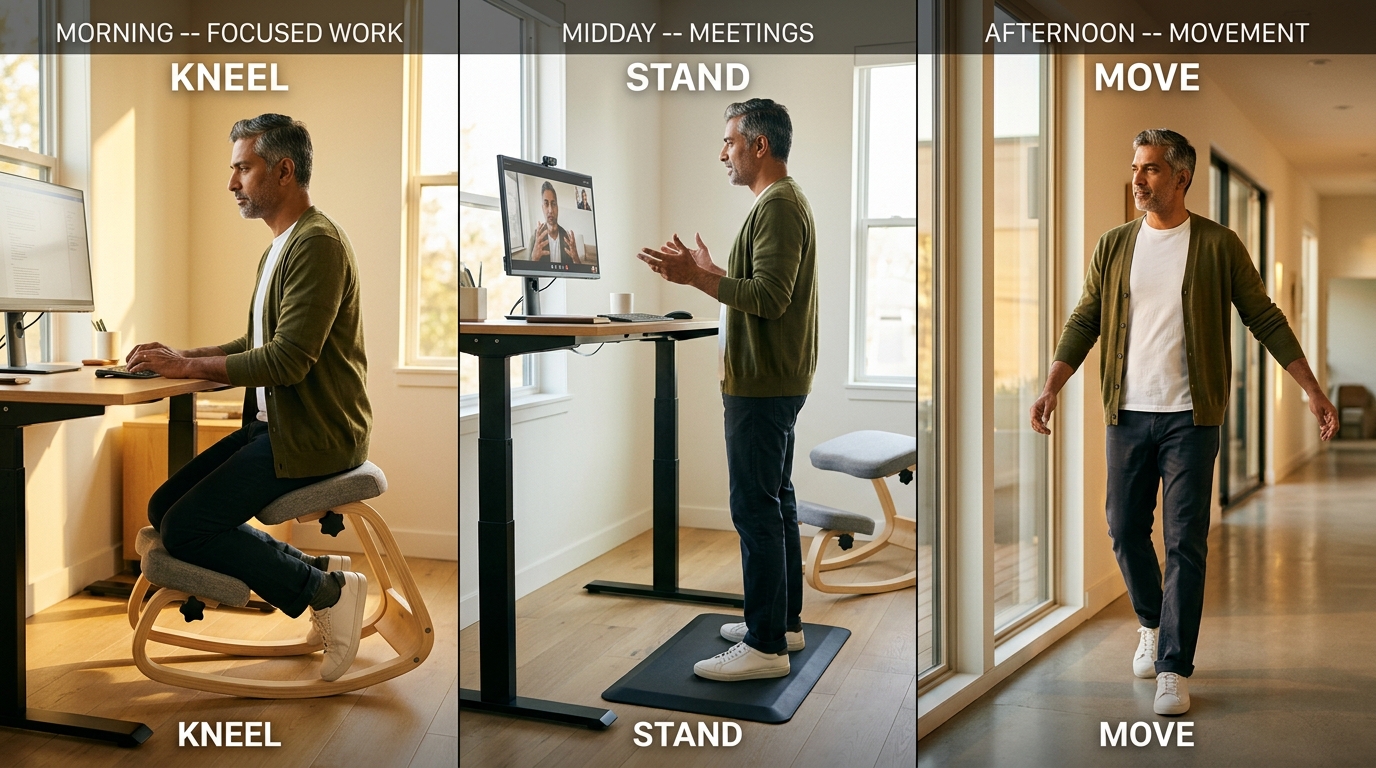
- 40% active sitting (kneeling chair or dynamic chair) for focused work and typing
- 30% standing for calls, brainstorming, and quick tasks
- 20% conventional sitting (with lumbar support) for rest periods
- 10% walking and movement breaks throughout the day
Who Should Avoid Standing Desks
Standing desks are not appropriate for everyone. Consult a healthcare provider before transitioning if you have any of the following conditions.
- Peripheral vascular disease or venous insufficiency – standing increases blood pooling
- Chronic foot conditions like plantar fasciitis – prolonged weight-bearing worsens inflammation
- Advanced knee osteoarthritis – static standing loads the joint without movement benefits
- Pregnancy-related pelvic pain – added pressure on the pelvic floor
- Balance disorders – standing work surfaces create fall risk
For these groups, a kneeling chair or other active seating option may be a better alternative. You get the spinal benefits of an open hip angle without the lower extremity stress. For remote work ergonomic tips that do not require a standing desk, see our guide.
The Bottom Line
Standing desks genuinely reduce back pain and boost energy. But the dramatic claims about calorie burning and disease prevention are overstated. The real value is not in standing itself – it is in breaking the cycle of static positioning.
- This week: Start with the 4-week transition protocol if going the standing desk route
- This week: Set a 30-minute timer to alternate between positions
- This month: Consider adding an active seating option for focused work
- Ongoing: Build toward the hybrid ratio – 40% active sitting, 30% standing, 20% conventional, 10% walking
The optimal position is always your next one. Whether you stand, kneel, sit, or walk – the key is variety. Give your spine the movement and position changes it was designed for. For posture exercises for standing desk users, see our comprehensive guide.
Standing, Sitting, or Something in Between?
The best ergonomic setup depends on your body, your work, and your space. Our Chair Finder Quiz factors in all three and recommends the right combination.
Related Reading
- Standing desk vs kneeling chair
- Why sitting causes back pain
- Desk ergonomics fundamentals
- Exercises to pair with standing
References
- Betts, J. A., et al. (2019). “The energy cost of sitting versus standing.” European Journal of Applied Physiology, 119(5), 1101-1108.
- Biswas, A., et al. (2015). “Sedentary time and its association with risk for disease incidence, mortality, and hospitalization in adults.” Annals of Internal Medicine, 162(2), 123-132.
- Bridger, R. S. (1988). “Postural adaptations to a sloping chair and desk surface.” Ergonomics, 31(2), 281-296.
- Buckley, J. P., et al. (2015). “The sedentary office: expert statement on the growing case for change towards better health and productivity.” British Journal of Sports Medicine, 49(21), 1357-1362.
- Coenen, P., et al. (2017). “Associations of prolonged standing with musculoskeletal symptoms.” Human Factors, 59(5), 823-838.
- Graves, L. E., et al. (2018). “Evaluation of sit-stand workstations in an office setting.” BMJ Open, 8(2), e020135.
- Husemann, B., et al. (2009). “Comparisons of musculoskeletal complaints and data entry between a sitting and a sit-stand workstation.” Human Factors, 51(3), 310-320.
- Lin, Y., et al. (2012). “Effectiveness of anti-fatigue mats on lower limb discomfort during standing work.” Applied Ergonomics, 43(3), 581-585.
- Pronk, N. P., et al. (2012). “Reducing occupational sitting time and improving worker health.” International Journal of Environmental Research and Public Health, 9(12), 4184-4197.
- Smith, P., et al. (2019). “The relationship between prolonged standing and symptoms of cardiovascular disease.” International Journal of Epidemiology, 48(2), 657-666.
This article contains affiliate links. ErgoLife Foundation may earn a commission at no additional cost to you. All recommendations are based on our independent research and mission to improve workplace wellness.